
Schedule an Inspection
Step 1: Create a BSA Online Account
- Go to www.bsaonline.com
- Click Currently Not Signed In > Register
- Follow the instructions to create a new account
- Call the Building Department at 248-433-7715 and ask to have your bsaonline account linked
- Inspections are scheduled on www.bsaonline.com. You must be signed into bsaonline.com to schedule inspections.
Step 2: Schedule Inspections on BASONLINE.COM
- Sign into www.bsaonline.com (top right of screen)
- To the left of the User Name, confirm the municipality is Bloomfield Twp
- In the black bar, to the left, click Services
- Click View My Building Department Activity
- On the next screen, click the Permits tab
- All of your Bloomfield Twp permits will load
- Locate your permit; click Schedule Inspection (found at the right of the permit)
- Follow all prompts to schedule the inspection
- If you receive a confirmation email, the inspection was successfully scheduled
- Sign into www.bsaonline.com
- Click on the 3 white horizontal lines (menu) at the top left of the screen
- Click Services
- Click View My Building Department Activity
- On the next screen, click the Permits tab
- All of your Bloomfield Twp permits will load
- Locate your permit. Turn the phone screen HORIZONTAL to see all options.
- Click Schedule Inspection (found at the right of the permit)
- If you receive a confirmation email, the inspection was successfully scheduled
Troubleshooting
- Click on Currently Not Signed In (If using a cell phone, click on the 3 white horizontal lines, then
click Currently Not Signed In) - Click on the help link to access your user name or password
See instructions to Schedule Inspections on BSAONLINE.COM
Are you signed in? Must be signed into www.bsaonline.com to schedule inspections.
Are you signed in with the user name linked to your permits with Bloomfield Township? The user name linked to Bloomfield Township is the only user name authorized to schedule inspections on your permits. Signing in with the wrong user name will give an error message or state a PIN is needed. See below for instructions on how to add other users to your linked account.
Are you in the correct municipality? Click on the Municipality. Click Change Municipality. Enter Bloomfield Township. NOTE: There are 2 Bloomfield Township’s in Michigan. Make sure you click on Bloomfield Township – Oakland County, NOT Bloomfield Township – Missaukee County.
Permit order is usually oldest to newest. Go to go the last page for more recent permits.
The main bsaonline account linked to Bloomfield Township may authorize other users to have access to schedule inspections and apply for online permits.
- The linked account user must sign into www.bsaonline.com
- Click My Account (If using a cell phone, click the 3 white horizontal lines at the top left, then click My Account)
- Click Grant User Permissions
- Click +Add User
- Enter the user name for the person you are granting permission to
- Grant user permissions by checking the applicable boxes
- Click the green check box. Now this user may sign into bsaonline.com with their own user name and password and be authorized to schedule inspections and/or apply for online permits
Bloomfield Township does not use PINs. Instead, we link the account.
- Confirm you are signed into bsaonline.com with the linked user name and are in the correct municipality (Bloomfield Township – Oakland County).
- If your user name is not the linked user name with Bloomfield Township, the person with the linked user name will need to add you to their account and grant user permissions.
- If you do not have a bsaonline.com account, create an account and call 248-433-7715 to have your account linked.
Cancel an Inspection
An inspection must be canceled prior to 5pm the day before your scheduled inspection. To cancel or reschedule your inspection:
- Sign into www.bsaonline.com
- Go to Services, View My Building Department Activity
- Click on the Permits tab
- Locate your permit and click View
- Locate your inspection and click View
- Use the Cancel button at the top right of your permit.
FAQ About Inspection Services
No, however access must be provided to the inspector on the scheduled inspection day.
Contact the Building Division at 248-433-7715 between 7:00 AM –8:00 AM the morning of the scheduled inspection to get a time frame from the inspector based on their schedule for the day. You may have to leave a message and they will return your phone call.
Building code interpretation or code related questions may be addressed by the appropriate inspector at the following times; between 7:00 AM – 8:00 AM and 5:00 PM – 5:30 PM, Monday – Thursday.
About Inspections
Generally, inspections are performed at the foundation, rough, insulation and final stages. Other inspections may be required during construction depending on the extent of the construction project. Inspections are required for all permitted work.
Meet Our Inspectors
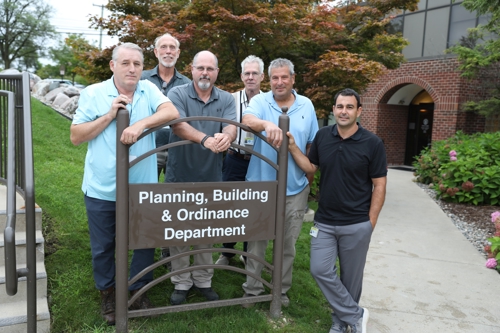

Building Official - Bob Thibeault
- Act 407 Registered Building Inspector
- Act 407 Registered Plan Reviewer
- Licensed Builder
- Sworn Bloomfield Township Ordinance Enforcement officer
Professional Affiliations:
- Southeast Michigan Building Officials & Inspectors Association
- Huron Valley Association of Code Officials
- Downriver Association of Code Officials
The Building Official administrates and enforces the adopted Building Codes and Township Ordinances. The Building Official oversees the inspection staff of the Building Division and performs plan reviews and field inspections.

Assistant Building Official - Dean Lugashi
- Act 407 Registered Building Inspector
- Act 407 Registered Plan Reviewer
Professional Affiliations:
- Southeast Michigan Building Officials & Inspectors Association
- Huron Valley Association of Code Officials

Building/Mechanical Inspector - Bill Myers
- Act 407 Registered Building/Mechanical Inspector
- Act 407 Registered Plan Reviewer
- Licensed Builder
- Licensed Mechanical Contractor
Professional Affiliations:
- Southeast Michigan Building Officials & Inspectors Association
- Huron Valley Association of Code Officials
- Downriver Association of Code Officials Michigan Mechanical Inspection Association
- Mechanical Inspectors Association of Michigan

Electrical Inspector – Ross Chapman
- Act 407 Registered Electrical Inspector
- Act 407 Registered Plan Reviewer
- Licensed Master Electrician
Professional Affiliations:
- Member of RECI

Mechanical Inspector – Larry Hettwer
- Act 407 Registered Mechanical Inspector
- Licensed Mechanical Contractor
Professional Affiliations
- Member of MMIA

Plumbing Inspector – Steve Fink
- Act 407 Registered Plumbing Inspector
- Act 407 Registered Plan Reviewer
- Registered Backflow Tester
- ASSE Certified Cross Connection Inspector
Professional Affiliations:
- American Water Works Association
- Plumbing Inspectors Association of Michigan
- Tri-County Plumbing Association